Pipedrive CRM architecture for B2B teams
Build a Pipedrive system your sales team can actually trust.
RevPipelines helps B2B teams clean, rebuild and operate Pipedrive around real sales motion: pipeline architecture, data standards, automations, outbound workflows, dashboards and SOPs.
30+ real client projectsAcross SaaS, services, insurance, healthcare, real estate and B2B sales teams.
5.0★ Upwork ratingReal client feedback tied to named companies and delivered Pipedrive work.
Pipedrive CRM architectureSales process translated into operating rules, fields, automations and dashboards.
Connected sales stackZapier · Make · Apollo · Sales Navigator · Slack
Selected companies represented across the RevPipelines project record.
View documented case studies →





















The operating problem
Your CRM is not broken because of features. It is broken because the process is unclear.
Pipedrive becomes unreliable when stage rules, ownership, data standards and follow-up expectations are left open to interpretation. The problem is usually operational before it is technical.
Reps use fields differently, so reports become useless.
Follow-up depends on memory instead of system rules.
Leadership cannot trust the forecast.
Leads enter from different sources with no clean ownership.
Automations exist, but they are built on messy logic.
CRM Control Audit Preview
See what a CRM audit actually checks.
Before rebuilding anything, RevPipelines reviews the commercial system behind Pipedrive: pipeline logic, data quality, follow-up discipline, automations and reporting reliability.
The audit does not guess financial impact. It identifies the exact CRM gaps that create pipeline risk and gives you a prioritized rebuild plan.
Deals with no next activity
Stages without clear exit criteria
Missing lead source or deal value
Duplicated or inconsistent records
Automations built on weak process logic
Reports leadership cannot trust
Leads without clear ownership
Follow-up depending on memory instead of rules
Forecasts contaminated by old or stale deals
Contacts and organizations without clear segmentation
Lead sources that cannot be measured
Sales activities logged inconsistently
Productized services
Choose the level of CRM control you need.
Not just CRM setup. Sales process translated into operating rules, automations, dashboards and documentation your team can run.
CRM Audit & Revenue Control Report
For teams already using Pipedrive but unable to trust the pipeline, follow-up or reporting.
- Pipeline structure review
- Stalled deals
- Missing fields
- Dirty data
- Automation review
- Reporting gaps
- Follow-up risks
- Prioritized roadmap
Deliverables
CRM audit reportLoom walkthroughImplementation plan
Pipedrive Launch / Rebuild Sprint
For teams starting with Pipedrive or rebuilding a setup that no longer reflects how sales actually works.
- Pipelines
- Stages
- Custom fields
- Activities
- Ownership rules
- Automations
- Dashboards
- Training notes
Deliverables
Working Pipedrive systemOperating rulesHandoff walkthrough
Outbound Pipeline System
For B2B teams that need outbound lists, lead sources and sales activity connected cleanly into Pipedrive.
- ICP structure
- Apollo / Sales Navigator
- Surfe / Waalaxy workflow
- Lead source tracking
- Qualification fields
- CRM import rules
- Sales handoff
- Follow-up activities
Deliverables
Outbound-ready workflowClean lead trackingSource-to-deal visibility
RevOps Control Room
Monthly CRM, reporting and automation support for teams that need Pipedrive maintained, improved and governed over time.
- CRM maintenance
- Monthly health checks
- Reporting review
- Automation fixes
- Data cleanup
- SOP updates
- User support
- Feature rollouts
- Pipeline health review
- Quarterly review
Deliverables
Monthly health reviewPrioritized fixesQuarterly RevOps review
Data Quality & Migration Discipline
Clean data first. Automation second.
Most CRM problems get worse when automation is built on top of messy data. RevPipelines reviews, cleans and structures CRM data before adding workflows, reporting or outbound processes.
A CRM cannot report accurately if the data model is inconsistent.
Deduplication rules
Field standardization
Contact and organization cleanup
Lead source hygiene
Import validation
Lost reason consistency
Deal value and expected close date hygiene
Segmentation logic
Ownership rules
Safe migration from spreadsheets or legacy CRMs
CRM Adoption & Enablement
A CRM only works if the team knows how to run it.
RevPipelines documents how the system should be used so sales reps, managers and admins follow the same rules.
SOPs
Loom walkthroughs
Role-based training notes
Admin handoff
Pipeline usage rules
Field definitions
Follow-up expectations
Reporting review cadence
Operating framework
The RevPipelines Method
The sequence matters. Process and data are defined before automation and reporting are treated as finished.
01
Audit the revenue system
Understand pipelines, lead sources, fields, automations and reporting gaps.
02
Define the operating rules
Clarify stage criteria, ownership, required fields, activities and handoffs.
03
Clean and structure the data
Standardize fields, validate imports, reduce duplicates and prepare reporting logic.
04
Rebuild Pipedrive around real sales motion
Configure pipelines, fields, views, automations and dashboards.
05
Test the system before handoff
Validate sample deals, workflows, routing, reporting and edge cases.
06
Document and train
Create SOPs, Loom walkthroughs and operating rules for users and admins.
07
Optimize monthly
Keep CRM, reporting and automation aligned as the business changes.
Before / After
From messy CRM to operating system.
The difference is not more features. It is a shared commercial language inside Pipedrive.
Before
- Deals stuck with no next step
- Duplicate records
- Unclear stages
- Manual follow-up
- Weak reporting
- No source tracking
- Reps using CRM differently
- Leadership guessing forecast
After
- Clear stage criteria
- Clean data standards
- Required fields
- Activity-based follow-up
- Automations supporting real process
- Dashboards leadership can trust
- Source-to-deal visibility
- Documented operating rules
Qualification
When RevPipelines is the right fit.
A focused specialist is most useful when the team is ready to define how sales should operate, not just add more fields.
Good fit
Practical CRM and RevOps work for teams ready to make clear operating decisions.
- You use or plan to use Pipedrive as your sales CRM.
- Your pipeline does not reflect how sales actually works.
- You need cleaner follow-up and better reporting.
- You have leads coming from multiple sources.
- You need data cleanup before automation.
- You want a practical system your team can use.
Probably not the right fit
Some requests need a different type of provider or stronger internal alignment first.
- You only want cheap data entry.
- You want automation before fixing process.
- You need a full enterprise Salesforce implementation.
- You are not ready to define ownership, stages or required fields.
- You want vanity dashboards without data discipline.
AI-ready CRM Foundations
AI is only useful when the CRM underneath is clean.
AI assistants, scoring and workflow recommendations depend on structured data, consistent fields and reliable activity history. RevPipelines helps prepare Pipedrive so future AI workflows have something trustworthy to work with.
Clean fields
Standardized stages
Reliable activity history
Consistent lead sources
Documented process rules
Structured reporting layer
Featured case studies
Real Pipedrive work with operational context.
Three representative engagements backed by scopes, audits, SOPs, implementation records and client feedback. No invented outcome numbers.
Whip Media
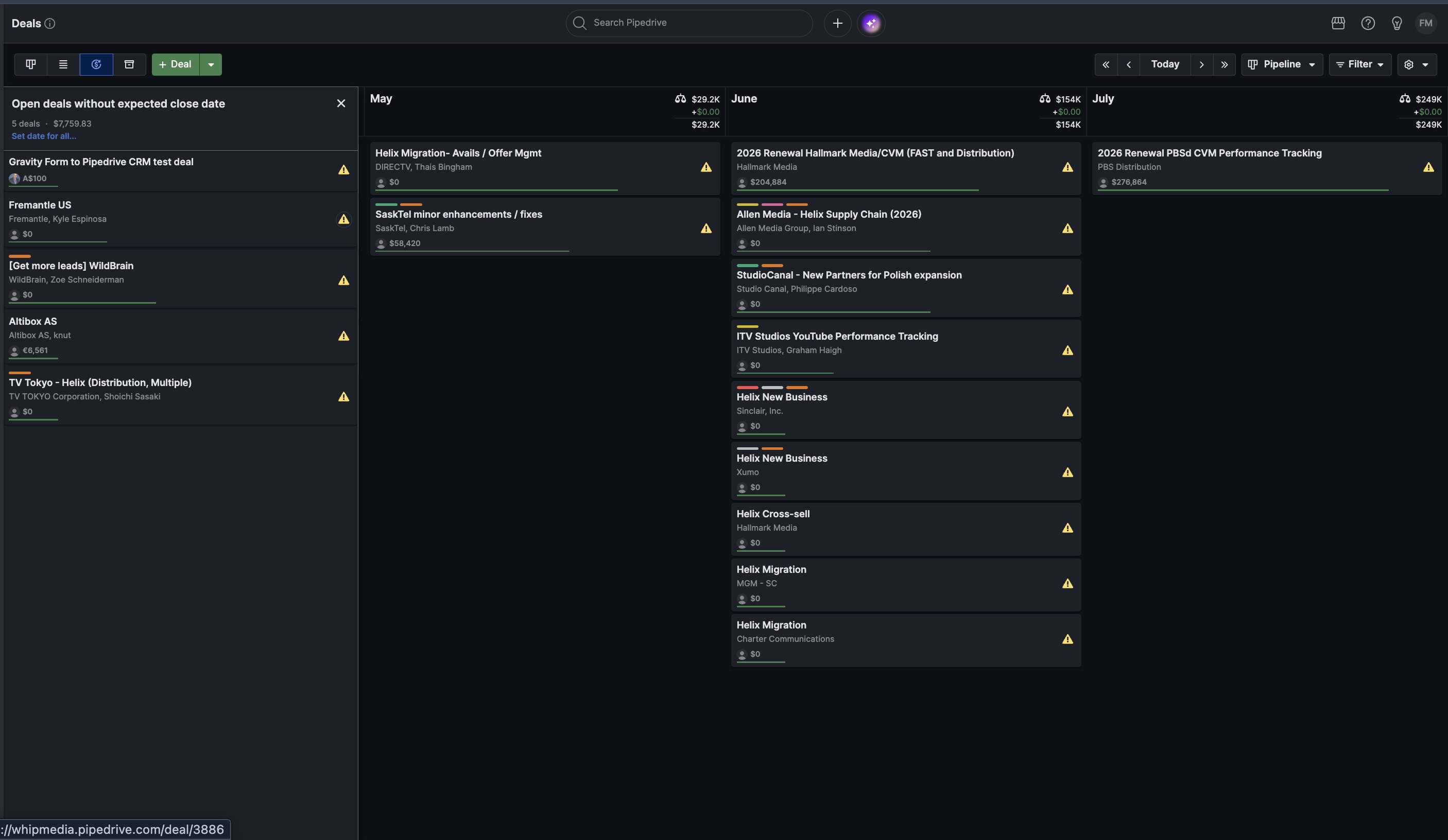
Enterprise SaaS · Executive reportingProblem: complex reporting and pipeline visibility requirements after losing internal Sales Ops support.
Built: dashboard logic, reporting scope, CRM recommendations and an improvement roadmap.
Improved: a clearer, more scalable Pipedrive operating environment for leadership visibility.
In-Pulse CPR
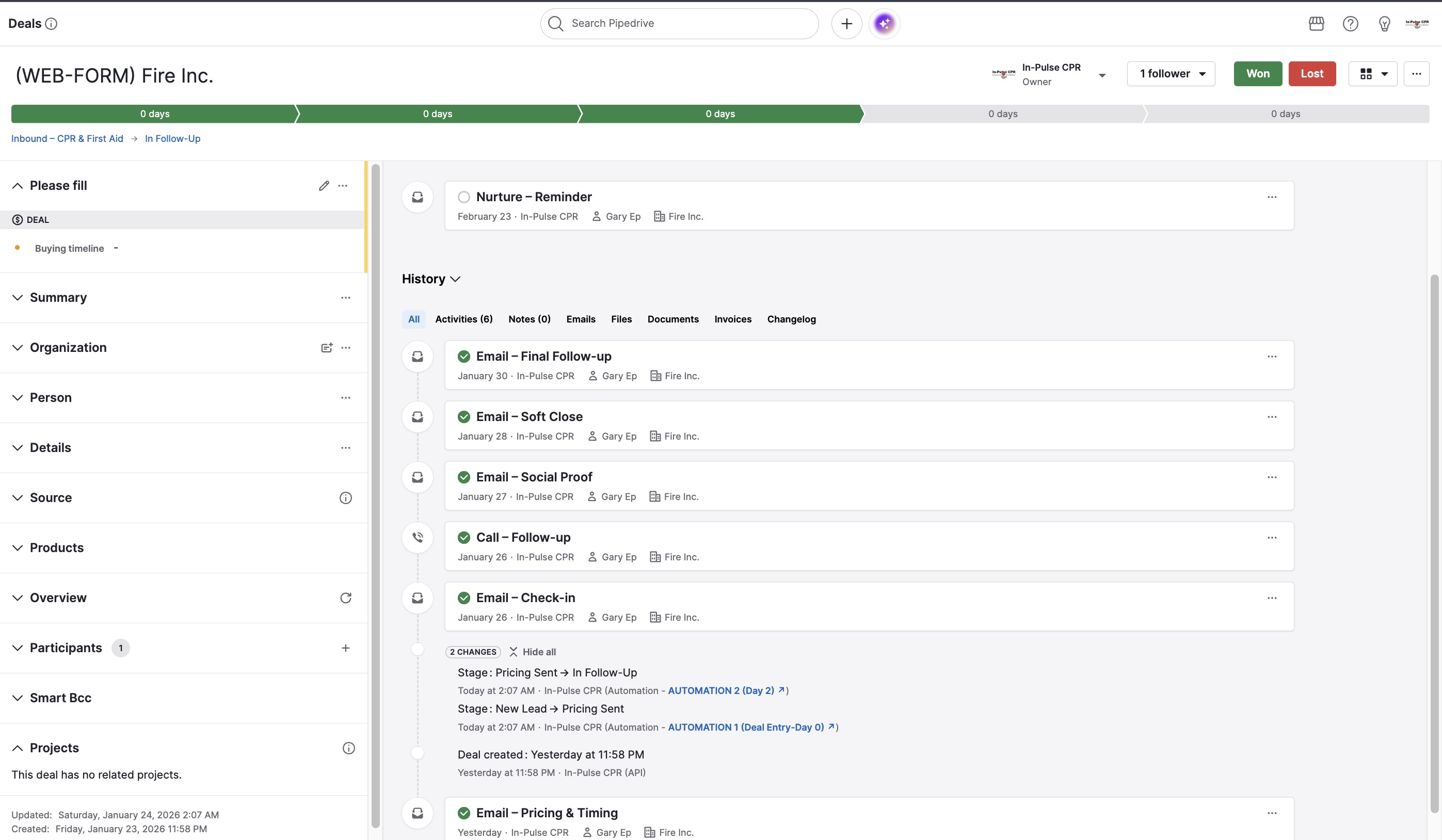
Healthcare services · CRM automationProblem: follow-up, activity creation and reminders needed more consistency.
Built: SOPs, Pipedrive activity logic, automation structure and follow-up documentation.
Improved: clearer nurture steps and repeatable follow-up inside the system.
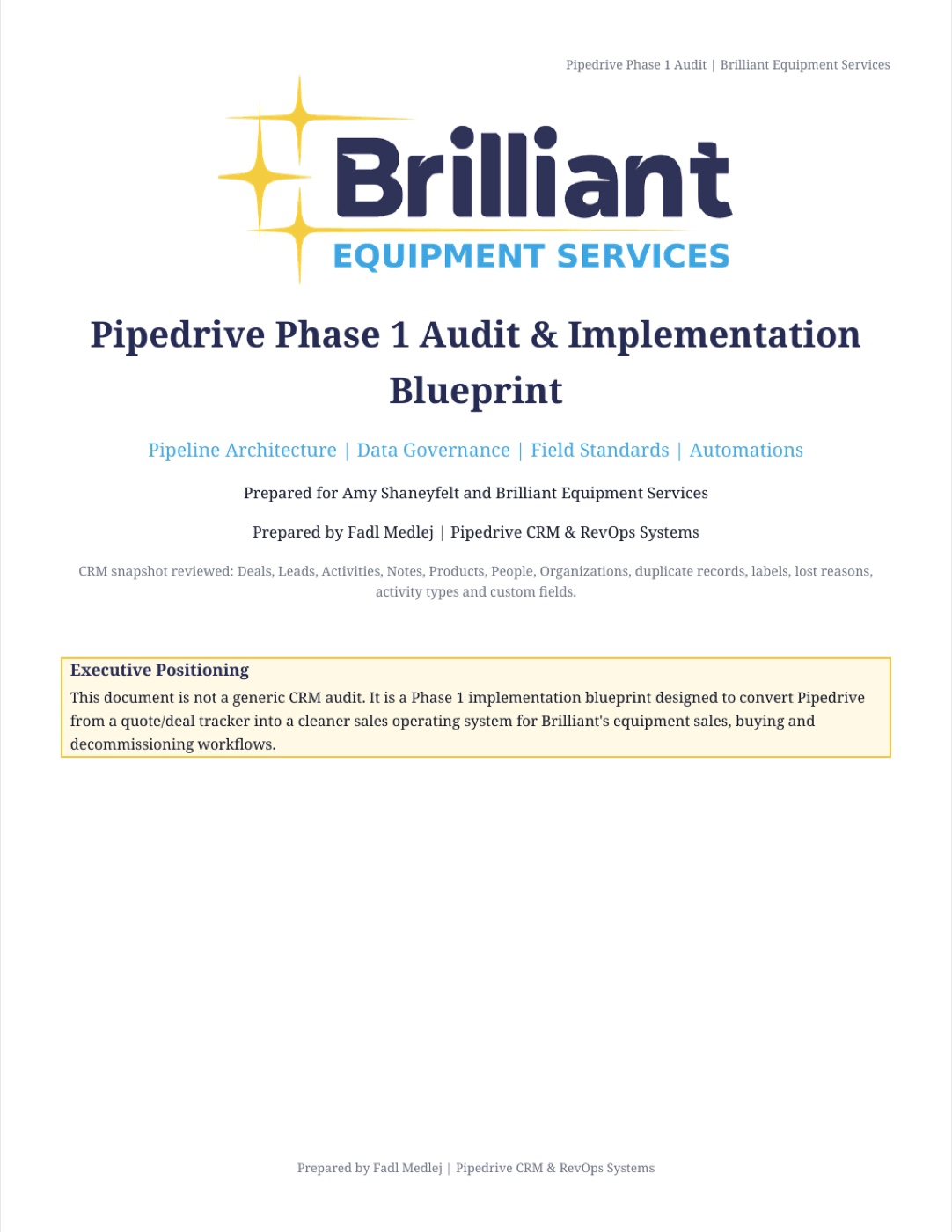
Brilliant Equipment Services
Equipment services · CRM governanceProblem: three useful pipelines existed, but stages, source, status, labels, activities and product data lacked a governed model.
Delivered: audit of 2,127 deals and related CRM datasets, plus a phased field, pipeline, deduplication and automation blueprint.
Result: a clear execution plan for improving accuracy before heavier dashboards and integrations.
Work in action
Proof organized by the work being done.
Real screenshots from the existing project library. Click any image to inspect it at full size.
Whip Media · Forecast viewExpected close dates and pipeline visibility for leadership reporting.
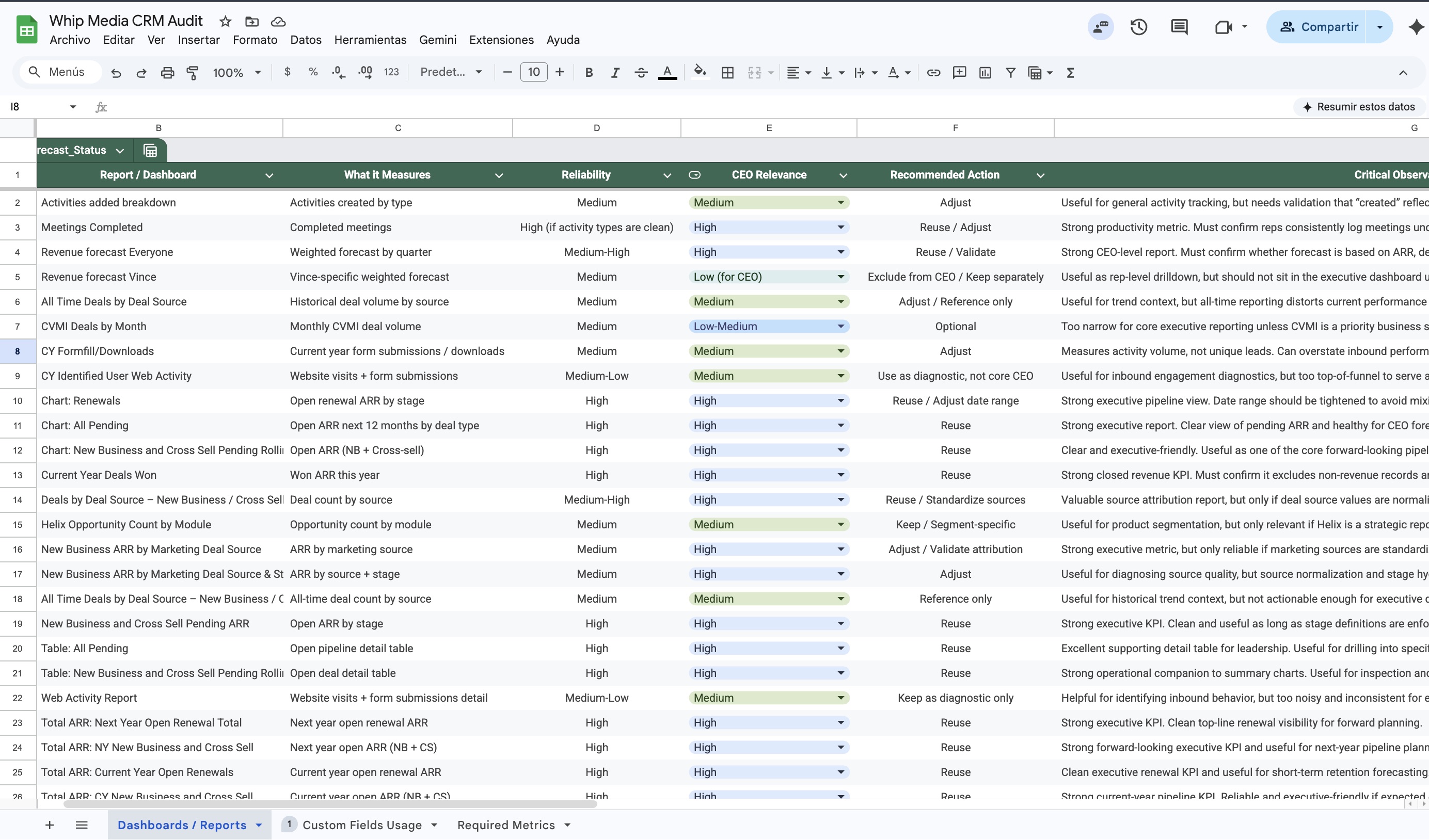
Whip Media · CRM auditDashboard and metric inventory with reliability and recommended action.
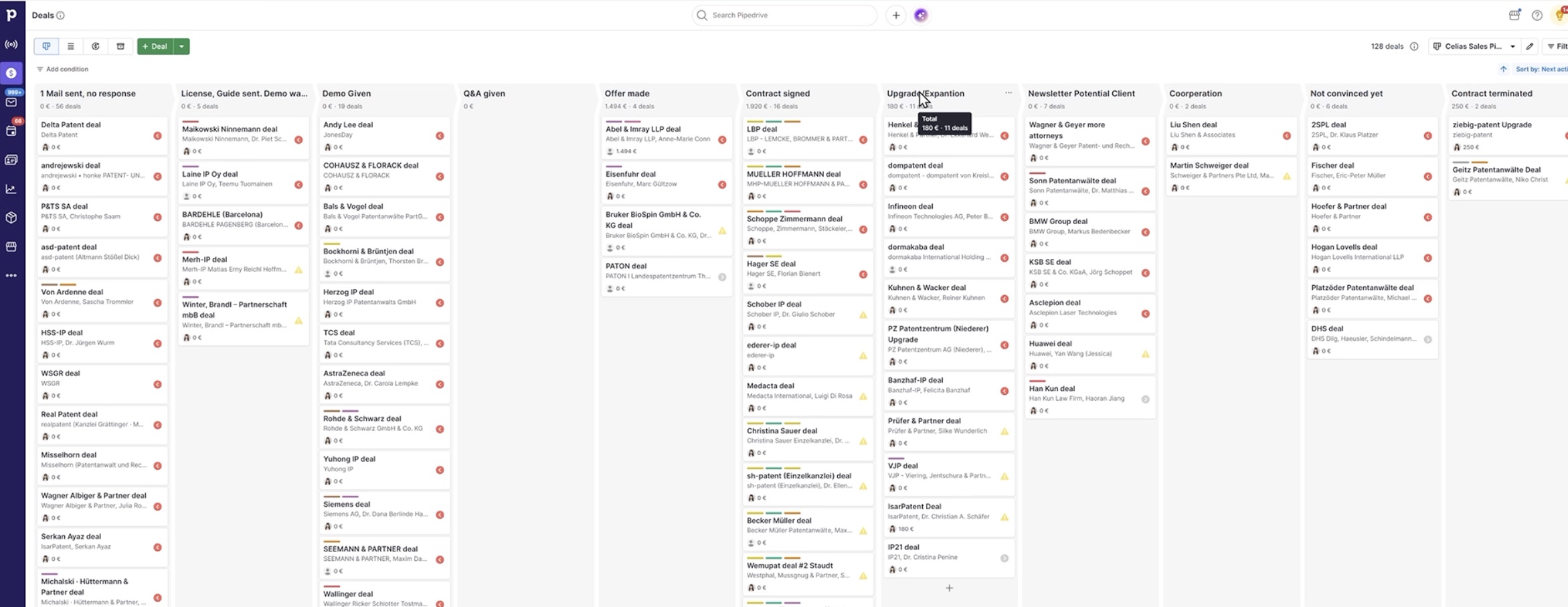
PatentMaker · Pipeline architectureCommercial stages, ownership and opportunity structure.
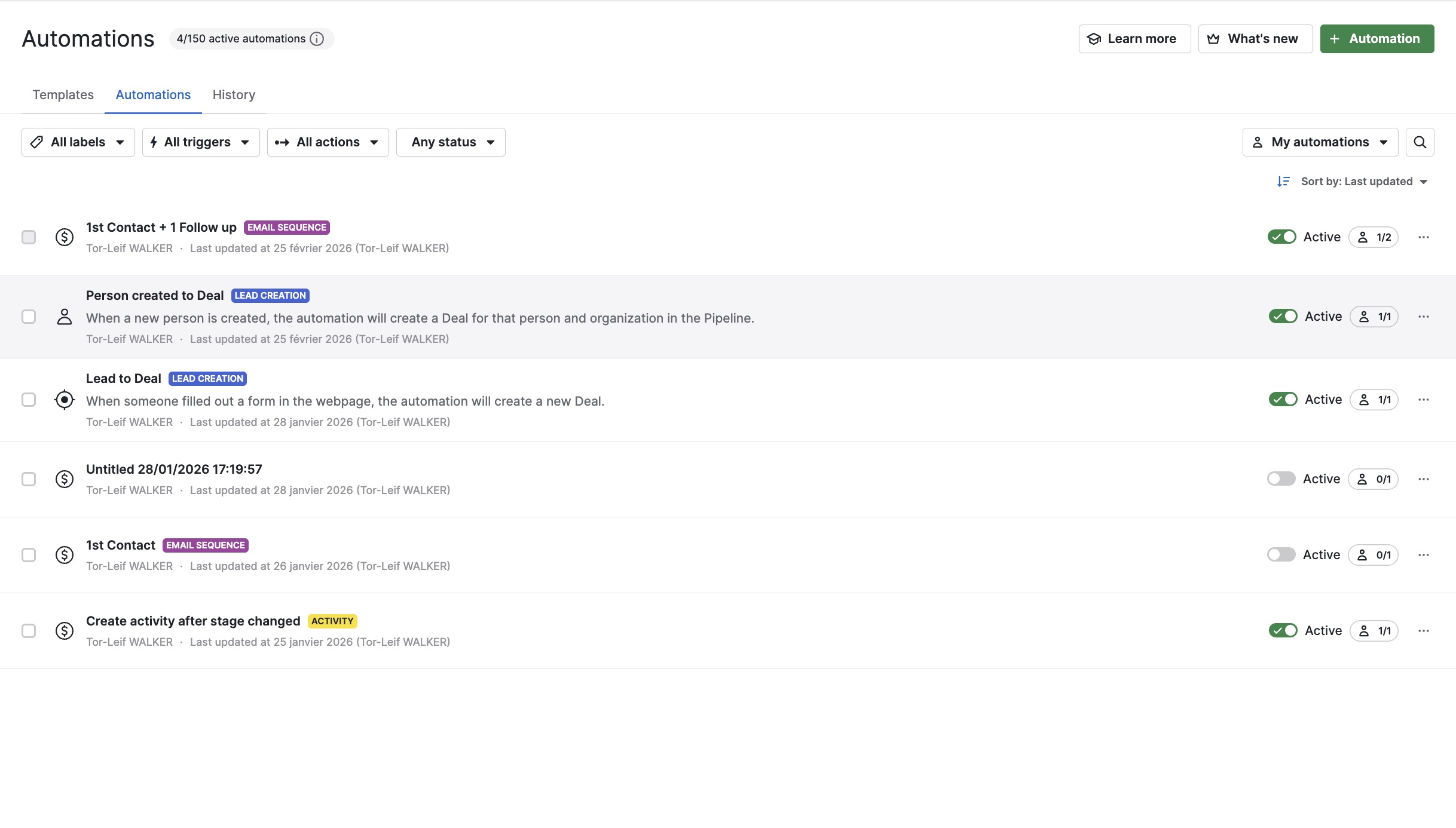
One Stone World · AutomationActive workflow rules supporting repeatable CRM activity.
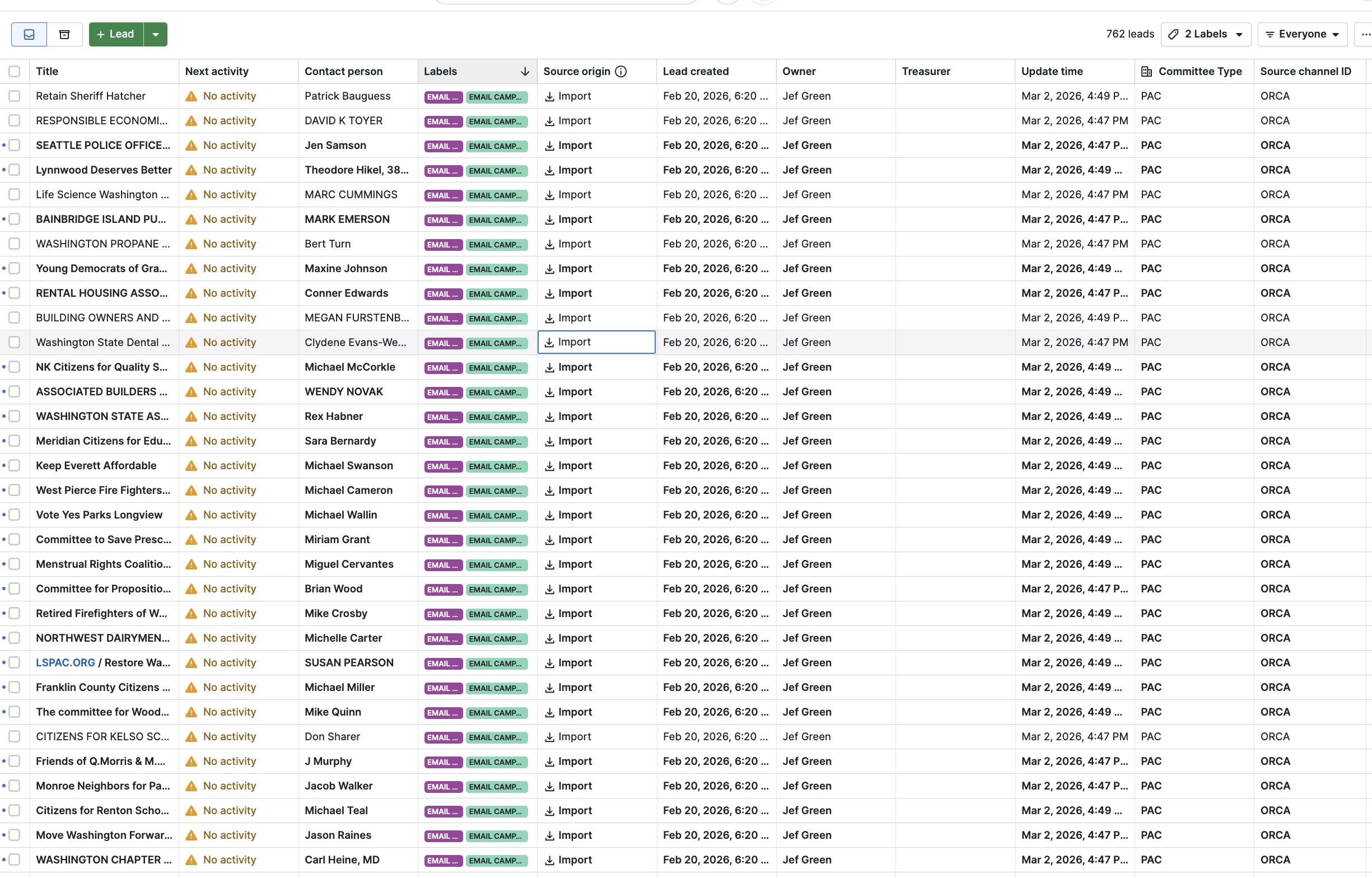
C&E Systems · Lead operationsOrganized lead records, source tracking and ownership preparation.
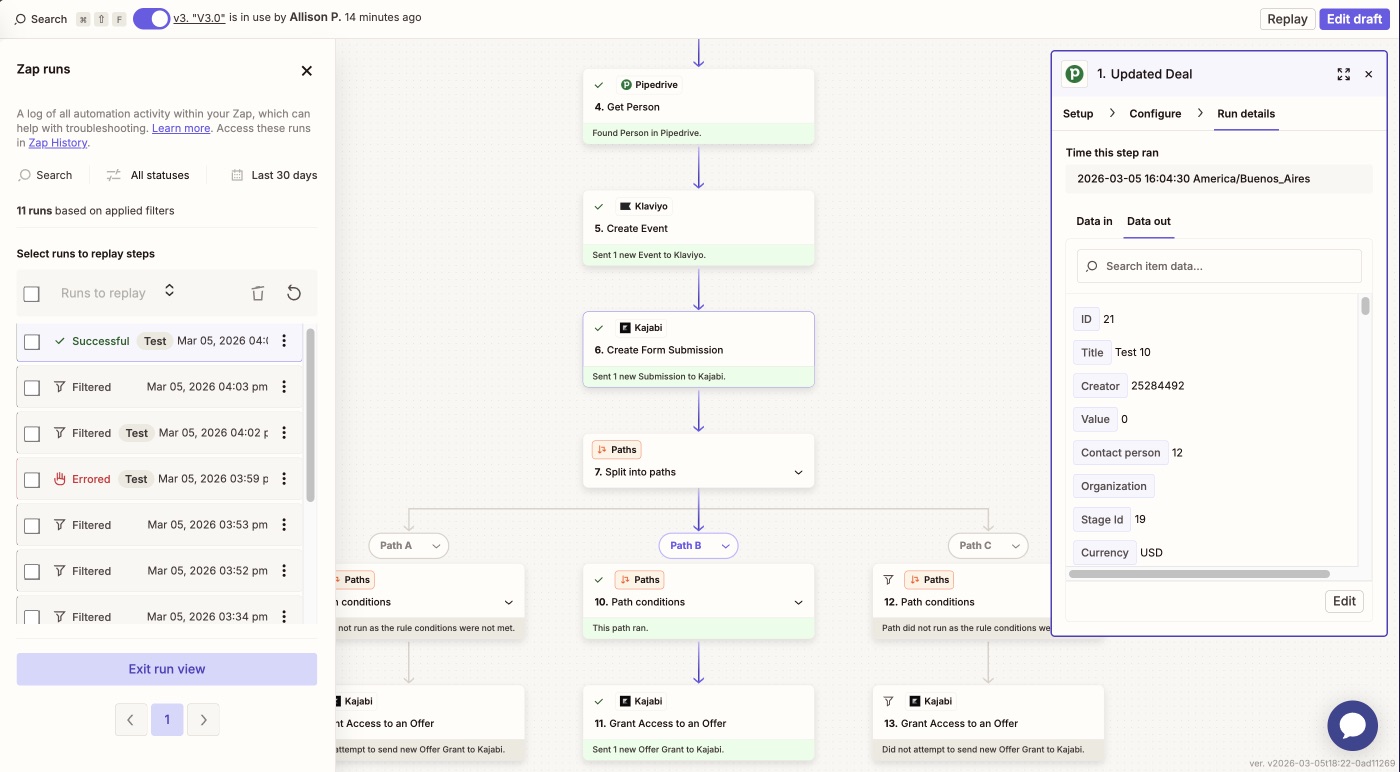
Lucia N.03 · Multi-step workflowPipedrive, Klaviyo, Kajabi and conditional paths in one operating flow.
In-Pulse CPR · Follow-up systemActivity history, stage movement and repeatable deal follow-up.
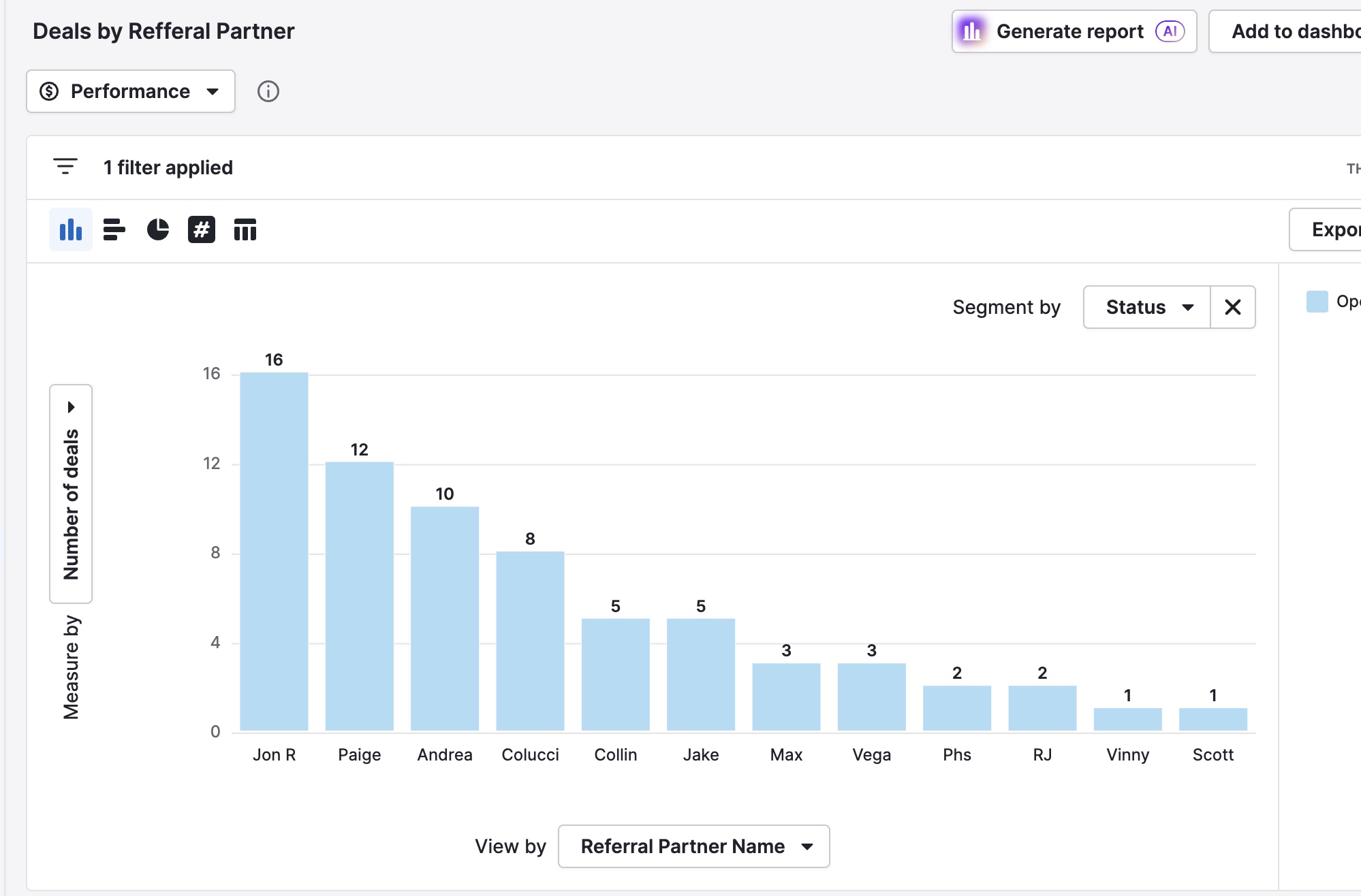
Medford Made Insurance · ReportingDashboard and deal visibility for an insurance sales workflow.
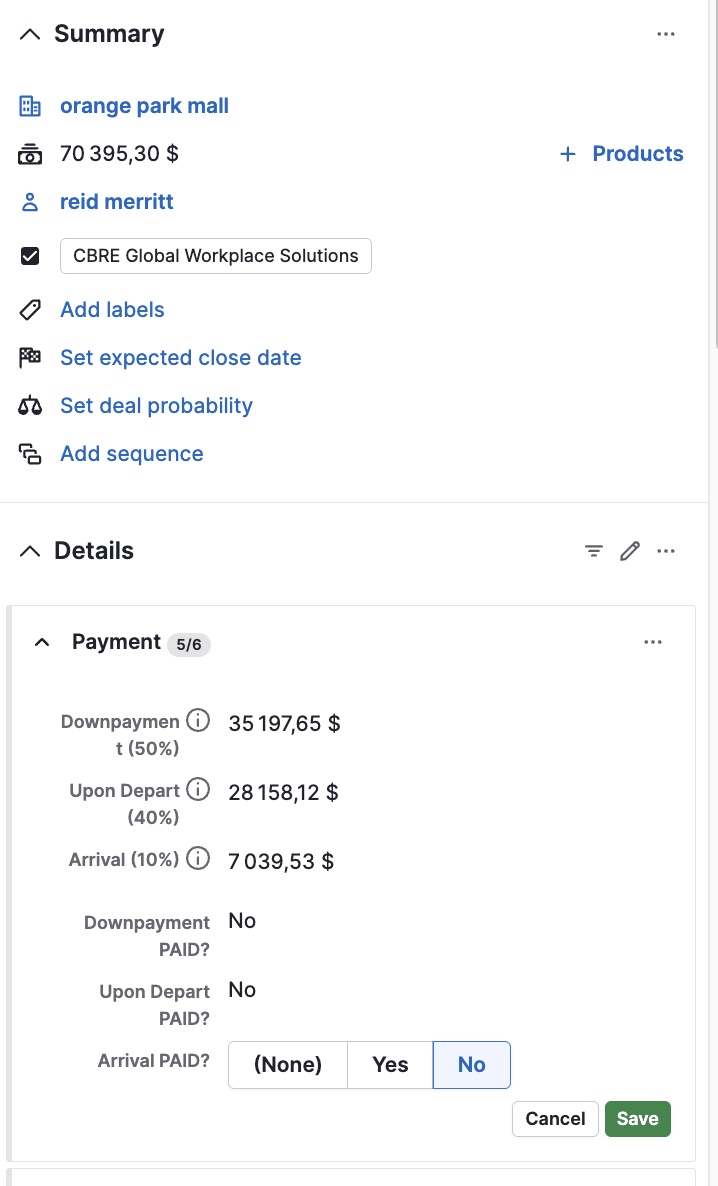
One Stone World · Data modelPayment percentages and status fields structured inside the deal.
Client feedback
Real reviews tied to real Pipedrive work.
Feedback is tied to the company or project record, so the proof reads like delivered CRM work instead of anonymous quotes.
“Everything was built cleanly, thoughtfully, and works exactly as intended. Communication was clear, he tested the flows, and delivered a professional, scalable system.”
“His work was impeccable and he helped us find solutions and get set up for our long term success using Pipedrive. His knowledge of the software was in depth.”
“Fadl has strong experience with the platform and was able to quickly understand our requirements and implement effective solutions. Communication was smooth.”
“He brought a deep understanding of CRM systems and real-world sales operations, improved our reporting structure, and helped create a much more scalable and actionable sales operations environment.”
“Fadl was reliable, trustworthy, and consistently engaged throughout the project. He was proactive in following up, flexible, professional and solution oriented.”
“Fadl was excellent and super responsive. Always on hand and completed the job successfully for us. We will absolutely work with him again.”
“Fadl works fast and is very efficient and helpful. Thank you.”
“Second time working with Fadel. He continues to deliver fantastic results. Very responsive and does a good job of helping me help him deliver.”
“Fadl was amazing. He set my Pipedrive automations up, made continuous tweaks and adjustments, and offered ideas on improvements.”
“Loved working with Fadl. Got my project done quick and with the utmost attention to detail, no issues whatsoever. Will hire again.”
Want a Pipedrive system your team can actually run?
Start with a CRM Audit. You will know what is broken, what to rebuild, what to automate and what reporting leadership can trust.